 ▶
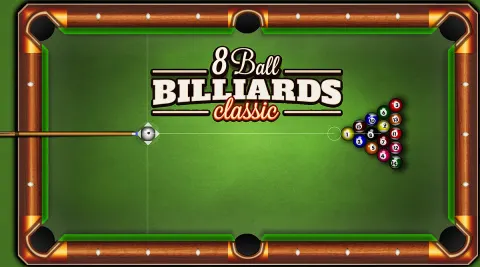
Rack 'em up and dive into the classic world of 8 Ball Billiards Classic! This game brings the timeless pool hall experience straight to your device, allowing you to challenge the computer across five difficulty levels or compete head-to-head with a friend on the same device. With realistic physics and intuitive controls, it's time to sharpen your cue skills and enjoy a game that's easy to pick up but challenging to master.
How to Play 8 Ball Billiards Classic?
- Set the difficulty: Choose between 1 - 5 (5 being most difficult) difficulty settings for the opponent AI.
- Understand the Objective: Your goal is to pocket all of your assigned balls (either stripes or solids) and then legally sink the 8-ball to win.
- Aiming and Shooting:
- Aim: Move your mouse or finger to position the cue stick in the desired direction.
- Adjust Power: Click and drag the cue stick backward to set the power of your shot.
- Shoot: Release to strike the cue ball.
Gameplay Mechanics:
- The first ball pocketed after the break determines your group (stripes or solids).
- Continue pocketing your group's balls.
- After clearing your group, aim to pocket the 8-ball to win.
Be cautious: sinking the 8-ball prematurely results in an instant loss.
Tips and Tricks:
- Use Auxiliary Lines: Enable guideline indicators to assist with aiming and predicting ball trajectories.
- Master Spin Control: Adjust the spin on the cue ball to influence its movement and position for subsequent shots.
- Plan Ahead: Think a few shots ahead to position the cue ball optimally for your next move.
What Are the Controls for 8 Ball Billiards Classic?
- Aim: Move your mouse or finger to position the cue stick.
- Adjust Power: Click and drag the cue stick backward to set the shot's power.
- Shoot: Release to strike the cue ball.
- Spin Control: Use the zoom feature to adjust the spin of the cue ball.
On mobile devices, simply tap and hold on the screen.
Features
- Realistic billiards physics
- Single-player mode with five difficulty levels
- Intuitive controls
- Auxiliary lines to assist with aiming
- Spin control for advanced shots
Playing 8 Ball Billiards Classic on CrazyGame
8 Ball Billiards Classic runs directly in your browser — no download, no install, no account. The game is served by its publisher inside the player above, so progress is stored by the game itself rather than on this site. If the player does not start, reload the page once; some titles take a few seconds to load their assets on the first run.
CrazyGame is a directory, not the developer of 8 Ball Billiards Classic. Every title links back to the publisher that hosts it, and titles are added or removed as that catalogue changes.