 ▶
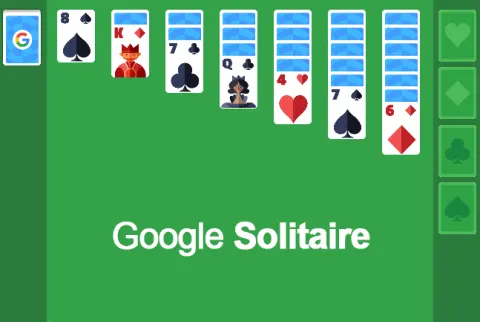
Google Solitaire is a digital version of the classic card game Solitaire, specifically the Klondike variation. This game is ideal if you're looking for a quick, accessible way to enjoy this timeless card game without any frills or unnecessary complications.
How to play Google Solitaire?
In Google Solitaire, your goal is to sort all cards into four foundation piles in ascending order (Ace to King), matching by suit. The game setup includes a tableau of seven columns of cards, a stockpile to draw new cards, and a waste pile for the cards from the stockpile that you cannot immediately use.
- Begin by dealing cards into the tableau: The first column has one card, the second has two, and so on, up to the seventh column. Only the top card in each column is face-up.
- Move cards within the tableau: You can stack cards on each other in descending order and alternating colors. For example, you can place a red 6 on a black 7.
- Use the stockpile and waste pile: If there are no available moves, draw cards from the stockpile. These cards go into the waste pile, where they can then be played onto the tableau or foundations.
- Build the foundation piles: Starting with Aces, add cards in ascending order by suit. The ultimate aim is to have each suit completed from Ace to King in its respective foundation pile.
What are the controls for Google Solitaire?
- Click and Drag: Move cards by clicking and dragging them to their destination.
- Double-Click: Auto-move a card to the foundation if a valid move exists.
- Stockpile Click: Reveal new cards by clicking on the stockpile.
Features
- Classic Solitaire gameplay
- Fullscreen mode available for an immersive experience
- Undo button to correct mistakes
- Hints available to help with possible moves
Playing Google Solitaire on CrazyGame
Google Solitaire runs directly in your browser — no download, no install, no account. The game is served by its publisher inside the player above, so progress is stored by the game itself rather than on this site. If the player does not start, reload the page once; some titles take a few seconds to load their assets on the first run.
CrazyGame is a directory, not the developer of Google Solitaire. Every title links back to the publisher that hosts it, and titles are added or removed as that catalogue changes.